Featured Post

Claude Code for Beginners: Step-by-Step AI Coding Tutorial

Image
 Artificial Intelligence is changing how developers write software. From generating code to fixing bugs and explaining complex logic, AI tools are becoming everyday companions for programmers. One such powerful tool is Claude Code , powered by Anthropic’s Claude AI model. If you’re a beginner or  an experienced developer looking to improve productivity, this guide will help you understand  what Claude Code is, how it works, and how to use it step-by-step . Let’s get started. What is Claude Code? Claude Code is an AI-powered coding assistant built on top of Anthropic’s Claude models. It helps developers by: Writing code from natural language prompts Explaining existing code Debugging errors Refactoring code for better readability Generating tests and documentation In simple words, you describe what you want in plain English, and Claude Code helps turn that into working code. It supports multiple programming languages, such as: Python JavaScri...

How to Find Max and Min Quickly in Python List

Here's logic to find Max and Min values in a List. Without using built-in Max() and Min () functions you can find Max and Min values in a List. For that matter, you need to write a user-defined function. This post is all about how to write it and run.

Finding Max and Min in List


You can achieve this by writing a user-defined function. Here's useful logic and steps to write it precisely.


IN THIS PAGE

  • Write a Function
  • Execute Function
  • Get the result
  • Write Function

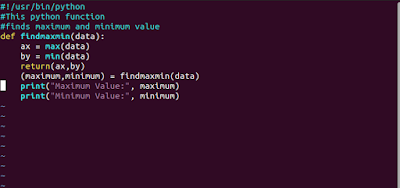
You can write an user-defined function to get MAX and MIN values. In this function, I am using the max(), min() built-in functions. The other variables you can use as you wish. Below is the my actual logic.


Python Function to find Maximum and Minimum Easily


Sample Code

def findmaxmin(data): 
ax = max(data) 
by = min(data) 
return(x,y)
data = (109, 98, 88, 7) 
(maximum, minimum) = findmaxmin (data) 
print("Maximum Marks = ", maximum) 
print("Minimum Marks = ", minimum)


Created a Script Using vim editor

Here as the first step, I have written the maxmin.py file in Ubuntu. The function name is  "findmaxmin ".

define function using input arguments

Result


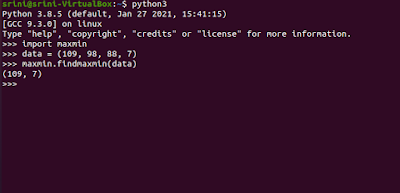
Below command to enter Python. This command, you can issue in Ubuntu where python3 is installed

$ python3

You have now entered Python3.

>>> import maxmin

You will prompt a message that imported successfully without any syntax errors.

Code in the Python Script


How to import python script and run


Below commands, I have issued.

>>> data = (109, 98, 88, 7)
>>> maxmin.findmaxmin(data)


The result is (109, 7)


References

Comments

Popular posts from this blog

SQL Query: 3 Methods for Calculating Cumulative SUM

Step-by-Step Guide to Reading Different Files in Python

5 SQL Queries That Popularly Used in Data Analysis