Data mining is a process to understand about unused data and to get insights from the data. You need a quick tutorial and examples to perfect with this process. The best example is the Backup data business use case to mine the data for useful information.
The backup data is simply wasted unless a restore is required. It should be leveraged
for other, more important things. This method is called Data Mining Technique. ---
For example, can you tell me how many instances of any single file
is being stored across your organization? Probably not.
But if it’s being
backed up to a single-instance repository, the repository stores a single copy
of that file object, and the index in the repository has the links and metadata
about where the file came from and how many redundant copies exist.
By simply providing a search function into the repository, you
would instantly be able to find out how many duplicate copies exist for every file you are backing up, and where they are coming from.
Knowing this information would give you a good idea of where to go
to delete stale or useless data.
After all, the best way to solve the data
sprawl issue in the first place is to delete any data that is either duplicate
or not otherwise needed or valuable.
Knowing what data is a good candidate to
delete has always been the problem.
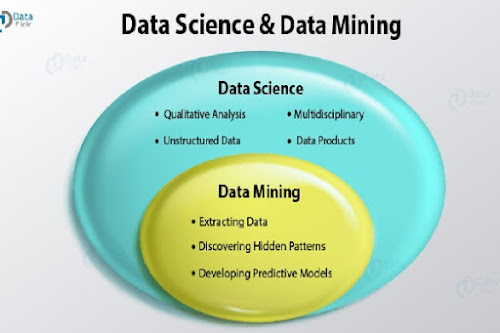
Data Mining vs Data Science
There may be an opportunity to leverage those backups for
some useful information. When you combine disk-based backup with data
deduplication, the result is a single instance of all the valuable data in the
organization. This is the best data for data mining.
With the
right tools, the backup management team could analyze all
kinds of useful information for the benefit of the organization and the business value would be compelling since the data is already there, and the
storage has already been purchased.
The recent move away from tape backup to disk-based deduplication
solutions for backup makes all this possible.
Being able to visualize the data from the backups would provide
some unique insights. As an example, using the free
WinDirStat tool.
A best use case is, I noticed I am backing up multiple copies of
my archived Outlook file, which in my case is more than 14GB in size. If you
have an organization of hundreds or thousands of people similar to me, that adds
up fast.
Top Questions ask Yourself if the Data Mining tool is needed
- Are you absolutely sure you are not storing and backing up
anyone’s MP3 files?
- How about system backups?
- Do any of your backups contain
unneeded swap files?
- How about stale log dumps from the database administrator
(DBA) community?
- What about any useless TempDB data from the Oracle guys?
- Are
you spending money on other solutions to find this information?
- Are you
purchasing expensive tools for email compliance or audits?
Advantages of Data
mining
- The backup data could become a useful source for data mining,
compliance and data archiving or data backup,
- Also, bring efficiency into data storage
and data movement across the entire organization.




Comments
Post a Comment
Thanks for your message. We will get back you.